Add your gear and film
Add your cameras and lenses, then load a new roll. Rolls you’re shooting and developing are listed together, so you can see where each one stands at a glance.
FILM SHOOTING LOG & EXIF EDITOR
The film shooting log & Exif app, made in Japan

FOR FILM SHOOTERS
Know when, where and how you shot it
Scanned film photos carry no record of when or where they were taken, or of your camera settings. There’s no way to look back at what gear you used or how you shot.
BEFOREWithout CONTACT
Tuesday • May 12, 2026 • 11:42 AM
✕Scan date
SP-3000
JPEG✕Scanner name
No lens information
6 MP・3089 × 2048・4.1 MB
AFTERWith CONTACT
Tuesday • May 5, 2026 • 6:16 PM
Nikon FM2
JPEGAi Nikkor 50mm f/1.4S
6 MP・3089 × 2048・4.1 MB
FUJIFILM FUJICOLOR 100
With CONTACT, your photos line up in the order you shot them, and you’ll be able to search them by gear, date or place. Look back at the settings and gear behind a shot that worked, and bring them to your next shoot.
HOW TO USE
01 — ALL ON YOUR PHONE
Write your shooting log into scanned photos (JPEG/TIFF) using nothing but your phone.
It only adds your shooting data — image quality is never affected.
02 — OPERATION
When you’re shooting, there’s no time for fiddly controls. CONTACT is built to log each shot quickly: camera settings, even lens changes, are all handled intuitively on a single screen.
ABOUT THE MAKERCONTACT is made by a UI/UX designer in Tokyo who still shoots film. Logging quickly without hesitation, never mis-tapping — every detail is crafted for the comfortable controls they wanted in the field.
03 — AUTO ASSIGN
Sometimes you forget. Out of 36 frames, only 11 were logged — even so, CONTACT infers the missing details and fills in every photo.
04 — FINISH ON MAC
With CONTACT LINK on your Mac, you can edit Exif data in more detail and with more flexibility. Shots you log on your phone arrive on your Mac as they are.
Along with JPEG and TIFF, it also supports DNG.
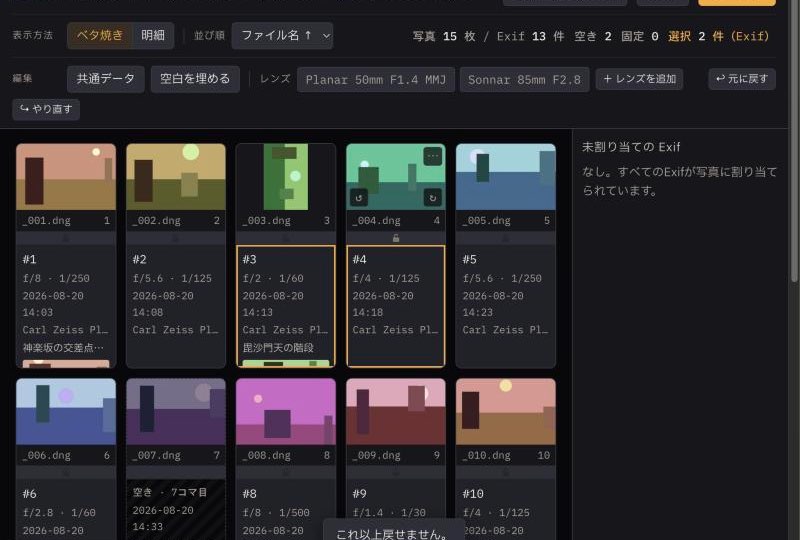
05 — DIGITAL × VINTAGE LENS
Mount a vintage lens without electronic contacts, and your digital camera records neither the lens name nor the focal length.
CONTACT keeps everything your digital camera recorded, and adds only the missing lens information.
PUBLIC BETA
Public beta All features are free until the end of February 2027
Films you log during the public beta stay free to write to your photos, even after the beta ends.
Give it a try, and let us know what features or improvements you’d like to see.
Try it free
Try it free on your phone
Scan the QR code with your phone’s camera to open CONTACT.
app.contactfilmlog.com
* Pricing from March 2027 will be announced later.
REQUIREMENTS
Open it in Safari on iPhone or Chrome on Android, and add it to your Home Screen. You can log shots and write to photos with just your phone.
Use it when you want more flexible editing on a large screen. Please use Chrome or Edge. Windows is not supported.
ExifTool (free) is required only for writing to DNG files. CONTACT LINK will guide you through it.
iPhone / Android: JPEG / TIFF · Mac: DNG / JPEG / TIFF
You can start without signing in. You sign in with your Google account only to save your logs to the cloud or to subscribe to a paid plan.
To add location to your Exif data, turn on location in the app’s Settings.
Both the phone app and CONTACT LINK on Mac are available in English and Japanese. They follow your device’s language, and you can switch it in Settings.
FAQ
WHY “CONTACT”
CONTACT is the contact sheet reimagined for the digital age — made to keep every memory behind each and every frame.